

server/discover for 2026 support and fall back to the legacy initialize negotiation — on both HTTP and stdio. You can also pin a specific version when you want to test an exact revision — including the 2026-07-28 stateless RC or any earlier stable release.
Where the setting lives
There are three places to set a version, and they layer:- Client → MCP Protocol — the host default applied to every server attached to that Client.
- Add Server modal → Connection overrides → Protocol version — a per-server override set at add time (available when adding a server to a shared project).
- Server card → Edit → Advanced settings → Protocol version — a per-server override that wins over the host default.
Available versions
Host default (client-level) dropdown
Automatic is stored as the selection policy
"auto" — it is not a wire literal and is never sent to the server. At connect time the SDK negotiates the era with the server rather than announcing a specific version up front. Picking any other option stores that exact version literal and pins the connection to that single revision.
When Automatic falls back to the legacy initialize handshake, it respects the client’s Supported protocol versions list (if set). The SDK negotiates only within that list and rejects a server that counter-offers a version outside it. If no list is set, the SDK’s built-in defaults apply. Choose an explicit version pin when you want strict, list-independent control.
Latest is derived, not hardcoded: it always labels the newest version in the SDK’s known-version list. Every other known revision is shown as a bare date.
The 2026 RC applies the stateless model across transports. MCPJam’s initial preview client is narrower: it currently supports the RC over Streamable HTTP POST. The per-server dropdown hides the RC option for STDIO and legacy SSE servers; if a host-level RC default reaches a non-HTTP server, the inspector fails the connection with a clear transport error instead of silently attempting the wrong protocol.
When you pin a client to a version that none of its servers advertise, a warning appears below the dropdown:
- Stateless pin (e.g.
2026-07-28) not advertised — the warning notes that the pin requires servers that offer this revision and has no legacy fallback. The draft saves successfully, but sessions against servers that don’t speak this revision will fail at connect time. Pick Automatic unless you are specifically testing that revision. - Stateful pin (e.g.
2025-11-25) not advertised — the warning notes that saving will fail. Pick an advertised version, or add the version tosupportedProtocolVersionsin the JSON editor below.
Setting the host default
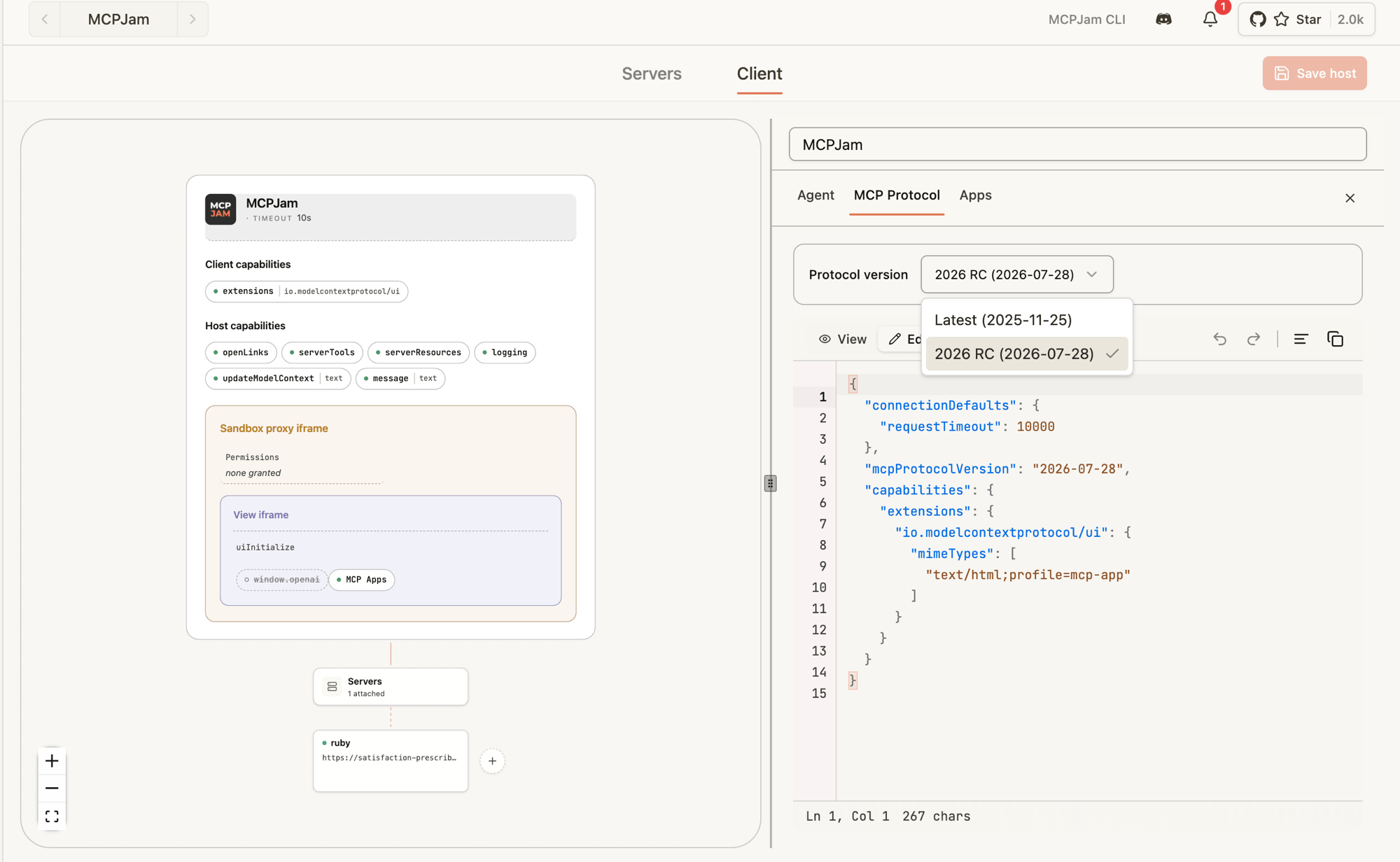
- Open the Clients tab.
- Pick the Client you want to edit (or create a new one).
- Open the MCP Protocol tab.
- In the Protocol version dropdown, pick a version:
- Automatic — stored as
"auto"; the SDK negotiates the era at connect time (default). - Latest (2026-07-28) — pin to the newest stateless revision.
- 2025-11-25 — pin to the 2025-11-25 stateful release.
- 2025-06-18 or 2025-03-26 — pin to an earlier stable revision.
- Automatic — stored as
- Save.
Overriding a single server
You can set the per-server protocol version either when adding a server or when editing an existing one.At add time (shared projects)
When adding a server to a shared project, the Connection overrides section of the Add Server modal includes a Protocol version picker. The 2026 RC option is only shown for HTTP servers.- Click Add server in the Servers tab.
- Fill in the server details.
- Expand Connection overrides.
- Pick Client default, Latest (2026-07-28), 2025-11-25, or an earlier stable revision from the Protocol version dropdown.
- Submit the form.
After adding (edit flow)
- Go to the Servers tab.
- Click the three dots on the server card → Edit (or open View server info → Edit).
- Expand Advanced settings.
- Find Protocol version and pick Host default, Latest (2026-07-28), 2025-11-25, or an earlier stable revision.
- Save and reconnect the server.
OAuth protocol alignment with MCP negotiation
When you add or edit an HTTP server with OAuth 2.0 authentication, the Authentication → Advanced → Protocol dropdown lets you choose which OAuth spec era the connect flow uses. The default is Auto. Auto is stored as intent; it is not converted into a permanent concrete pin when you save the server. Each OAuth flow resolves and records one concrete version in this order:- An explicit OAuth protocol selection.
- An explicit per-server or host MCP wire pin.
- The version freshly detected or negotiated with the MCP server.
2025-11-25when a401requires OAuth before the server can provide protocol evidence.
2026-07-28 explicitly.
OAuth callback security follows the concrete version recorded for that flow. Every version validates state. The 2026-07-28 flow also validates a returned RFC 9207 iss against the discovered authorization-server issuer; 2025 flows retain compatibility and ignore callback iss.
What changes when you pick Latest (2026-07-28)
If your server already speaks2026-07-28, you mostly won’t notice. A few things to know when you’re testing:
- No
initializehandshake. The inspector connects, immediately firesserver/discover, and uses the result to populate the server card’s name, version, capabilities, and instructions. - Per-request metadata. Every request the inspector sends carries
MCP-Protocol-Version: 2026-07-28as an HTTP header and the same value insideparams._meta["io.modelcontextprotocol/protocolVersion"].clientInfoandclientCapabilitiesride along on every request too. - No session IDs. The inspector never sends an
mcp-session-id. If your server returns one, the inspector discards it and surfaces a warning — your server isn’t conforming to the stateless RC. - Cancellation is closing the stream. For SSE responses, the inspector closes the response stream to cancel; your server should treat that as a cancel signal.
What the inspector tells you
- If your server doesn’t speak
2026-07-28, the connection fails with a message naming the server and the pinned version — for example,MCP server "my-server" doesn't support MCP protocol version 2026-07-28, which this client is pinned to.The error banner and any connect/reconnect toast include a Change protocol version button that opens the client’s MCP Protocol tab directly. Set the version to Automatic there to let the inspector negotiate whatever the server supports, or pick a version the server advertises. - If your server is missing a capability the inspector needs for a request, you’ll get
-32003 MissingRequiredClientCapabilityback from your server — surface those in the Activity log to confirm they reach you. - The Activity log (server card → Activity) is the source of truth — every request and response, success or error, lands there so you can verify headers and
_metacontent.
Not yet supported in the RC client
The 2026 RC client is a preview. A handful of pieces from the SEP family aren’t wired up yet — if you try them, the inspector throws a labeled error instead of silently no-op’ing:subscriptions/listen(long-lived notification stream)- Server-initiated requests via MRTR /
InputRequiredResultfor sampling and listRoots embedded in responses (elicitation viainput_requiredis supported — see Multi-round input) - Resumption tokens
- Automatic detection (HTTP and stdio) falls back to the legacy
initializehandshake whenserver/discoveris not available. An explicit 2026 pin remains exact and does not fall back.
tools/list, tools/call, resources/*, prompts/*, OAuth refresh, custom headers, progress notifications — the RC client behaves like the legacy one.
Recommended testing flow
- Build a Client called something like
Latest protocol sandboxwith MCP Protocol → Latest as the host default. - Attach the HTTP server you’re upgrading.
- Connect — confirm the server card shows the server info populated from
server/discover(name, version, capabilities, instructions). - Run a
tools/listand atools/callfrom the Tools tab. - Watch the Activity log for the request
_metaand theMCP-Protocol-Versionheader. - Try an unsupported version on a second test server to confirm your
-32004error envelope looks right. - Once your server is happy on Latest, keep one Client on Automatic (or pinned to 2025-11-25) so you can flip between versions without rewriting settings.
2026-07-28, the rest fall back to the host default.
Recommended reading
Background on the 2026-07-28 RC and the stateless direction the protocol is moving in:- MCP Is Growing Up — AAIF’s overview of what the 2026-07-28 RC means for teams building agentic systems.
- 2026-07-28 release candidate announcement — the official blog post walking through what the RC changes and why.
- MCP specification (draft) — the in-progress spec text the inspector’s RC client targets.